
What is bld?
bld is a build tool that lets you write your build logic in pure Java.
bld was created because we're not really interested in build tools. We use them because we have to, but we'd rather just get on with coding the real stuff.
bld is designed with the following principles in mind:
- Tasks don't happen without you telling them to happen.
- No auto-magical behavior, task behavior is explicit and API-defined.
- Managing libs yourself is fine, automating that is fine too, or mix and match.
- Build logic is written in Java, with all the advantages of Java.
- Standard collection of Java-centric tasks for common operations.
bldis distributed as a single jar, if you have the jar, you have the build system.
Join the Community Forums Chat on Discord
Designed for modern Java
bld requires Java 17 or later and supports the latest JDK releases. Your build logic stays concise and readable, and any Java IDE understands it. You get auto-completion and javadoc documentation, and you can split your build logic into multiple files and classes when you outgrow a single file.
Here is a complete bld file for a Java application using JUnit for its tests. Nothing else is needed to run it, test it and distribute it. The same project expressed with Maven and Gradle is shown alongside, so you can compare for yourself:
Pure Java, understood by your IDE from end to end
The same project as Maven XML
The same project as a Gradle build script
Where does bld fit?
Maven and Gradle describe a build for the tool to execute. bld is ordinary Java that runs directly.
| Maven | Gradle | bld | |
|---|---|---|---|
| Language | XML | Groovy / Kotlin | Java |
| IDE completion & refactoring | limited | with a plugin | full, it's Java |
| Debugging | attach to the JVM | attach to the daemon | the whole Java debugger: breakpoints, watches, … |
| Extensions | plugins | plugins / DSL | any Java jar, or a bld extension |
Writing your build logic in the same language as your application (Java) reduces the cognitive load, and taking actions immediately without having to mentally construct a described plan makes it easier to reason about your build.
Generate a build file
Prefer to see it change as you go? Adjust the options below and a real, complete bld build file regenerates on the server, exactly the Build.java you would write by hand:
Rendered live by rife2.com, which is itself a RIFE2 app built with bld. Open in its own tab.
One jar, everything included
Out of the box, bld knows how to create, compile, test, document, run, package and publish your projects. Transitive dependencies are
resolved and downloaded in parallel with live progress reporting, Maven bills of materials (BOMs) keep versions consistent across your dependency
tree, builds run offline when you want them to, and your artifacts publish straight to Maven Central through the
Sonatype Central Portal.
Modern Java deployment is covered as well, with first-class operations for Java modules, jmod, jlink runtime images,
jpackage native installers, and annotation processing.
When you need more, there's a growing collection of extensions: Kotlin, Spring Boot, Checkstyle, PMD, SpotBugs, JaCoCo code coverage, ANTLR4, PIT mutation testing, TestNG, and many others. Writing your own extension is just writing Java code.
Ready for AI agents
Since version 3.0, bld can serve your build commands as Model Context Protocol (MCP)
tools. AI coding agents get a structured interface to compile, test and run your project, with streamed command output and execution metadata
instead of scraped terminal text. Your build stays explicit and API-defined; agents just get a first-class way to drive it.
Connect It!
./bld mcp install         # register the project with Claude Code
./bld mcp install cursor  # register with Cursor
./bld mcp install vscode  # register with VS Code
IDE support
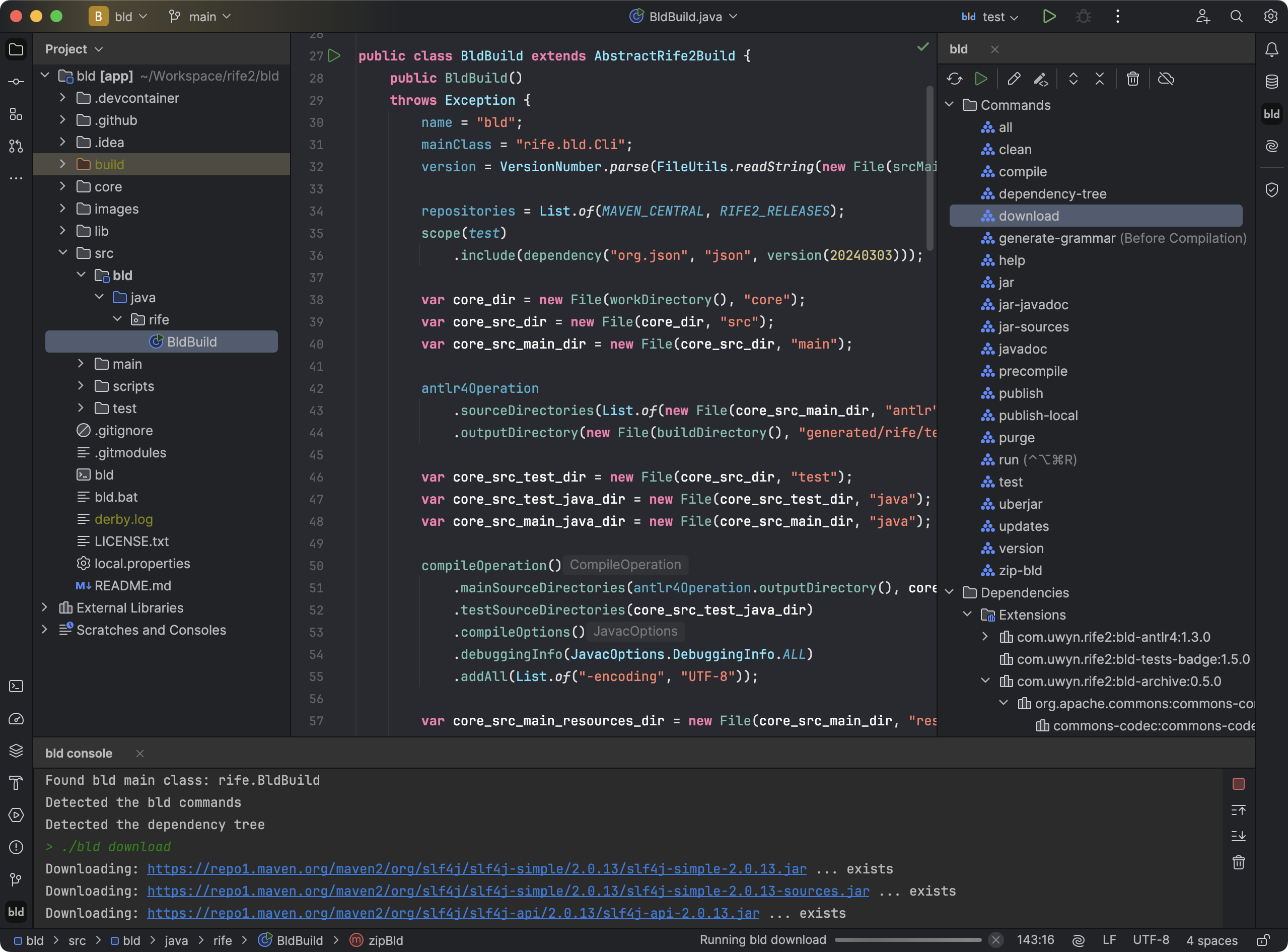
Since version 2.0, bld comes with its own IntelliJ IDEA plugin:
- Detect bld projects and find their main Java class
- Quick access to open and edit the main Java class and wrapper properties of bld projects
- List all the commands in bld projects in a side panel
- Execute one or multiple commands in the order they were selected
- Run bld commands from icons in the gutter of the build file
- Reload the commands in the bld project
- Automatically reload the commands and dependencies when the build sources or wrapper properties change
- Terminate currently running bld commands
- bld console panel for command output with source code hyperlinking
- Display the bld dependency tree
- Toggle to run bld in offline or online mode
- Toggle to show the bld console when a command is executed
- Auto-save all open files before executing a bld command
- Convenient bld one-click cache invalidation
- Set bld commands to run before or after IDEA compilation
- Create custom bld command run configurations
- Assign keyboard shortcuts to bld commands
Get started
bld lets your build logic get out of the way so that you can focus on writing applications.
Install It!
brew install rife2/tools/bld    # using Homebrew
sdk install bld                 # using SDKMAN!
jbang com.uwyn.rife2:bld:3.0.1  # using JBang
All install options Visit the project and read the documentation